
Installing the Microsoft 365 desktop applications
- Open your web browser and go to https://m365.cloud.microsoft/apps
- Sign-in using your CUNY Login credentials
- Select Install apps at the top right of the page.
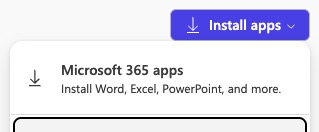
- Select Microsoft 365 apps to download the Microsoft 365 apps to your computer.
- To complete the installation, visit the Microsoft 365 installation page to see instructions specific to your operating system.
Watch a video of the installation process
Installing the Microsoft 365 mobile apps
The Microsoft Office mobile app combines Word, Excel, and PowerPoint into a single app, with the ability to view, edit, and share files without switching between multiple apps. Learn more.
iOS (Apple Devices)
- Download from that Apple App Store
- Set up the Office app and Outlook on iOS devices
- Learn how to use the Office app on iOS