
What is Copilot?
Copilot Chat is a platform you can use to engage in AI-powered conversations, asking questions, drafting content, and summarizing information, all within a secure and controlled environment as part of your CUNY Microsoft 365 account.

How do I access Copilot?
You can access Copilot Chat on the web at: Microsoft365.com/chat or from the Microsoft 365 mobile app. (Sign in using your CUNY Login.)
Where can I learn more about Copilot?
Training resources from Microsoft
- Overview of Copilot Chat for Microsoft 365
- Explore Microsoft 365 Copilot Chat
- Copilot Prompt Gallery: collection of pre-made prompts and guides to help you get the most out of Copilot.
Training resources from CUNY
- CUNY AI and Prompting Training (full recordings)
What is Microsoft Copilot Enterprise Data Security (EDP)?
Under the Microsoft Enterprise Data Security (EDP), Copilot used inside the CUNY Microsoft 365 tenant (from any Microsoft 365 on the web, mobile, or desktop) does not use your data to train its foundation models. Your prompts and responses remain logically isolated within the CUNY tenant.
Key aspects of EDP include:
- No Training on Customer Data: Prompts, responses, and data accessed via Microsoft Graph are explicitly excluded from training foundational LLMs (Large Language Models).
- Data Privacy & Security: Data is encrypted at rest and in transit. It operates under strict tenant isolation, ensuring one organization cannot access another’s data.
- Access Control & Permissions: Copilot respects existing Microsoft 365 permissions, including sensitivity labels, retention policies, and data access rules.
- AI Security Risk Mitigation: Features built-in protection against prompt injections, harmful content, and data leakage.
- Secure Web Search: When using web search, queries are anonymized to remove user/tenant identifiers and are not shared with advertisers.
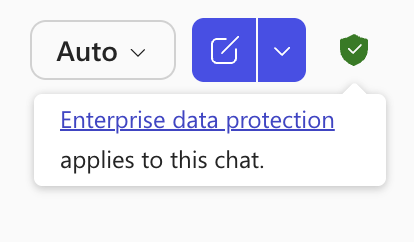
Look for the “Green Shield” icon in your chat sessions to be sure your Copilot interactions are covered within the EDP.
Learn more