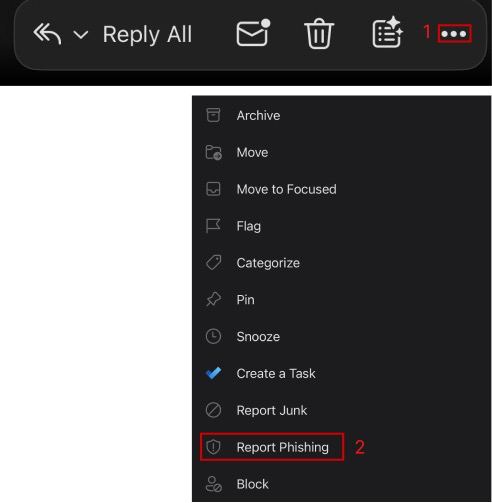
If you receive an email that appears to be a phishing or junk email, reporting it from your Outlook app helps Microsoft and CUNY protect the college from malicious emails.
What’s the difference between junk email and phishing?
Junk email (spam) is unwanted bulk mail, usually for ads, that clutters your inbox but isn’t directly harmful, while phishing is malicious spam designed to trick you into revealing sensitive info (passwords, credit cards) by impersonating trusted sources, leading to identity theft or financial loss. How to spot phishing emails.
Reporting from Outlook on the Web
With the suspicious email selected:
From the top ribbon select Report > Report phishing

Reporting from Outlook Desktop on Windows
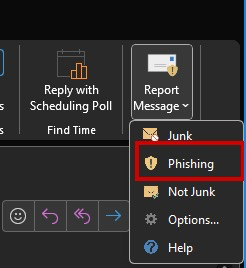
With the suspicious email selected:
From the top ribbon select Report Message > Phishing
Reporting from Outlook Desktop on Mac
With the suspicious email selected:
From the top ribbon select Report > Report Phishing

Reporting from Outlook on Android
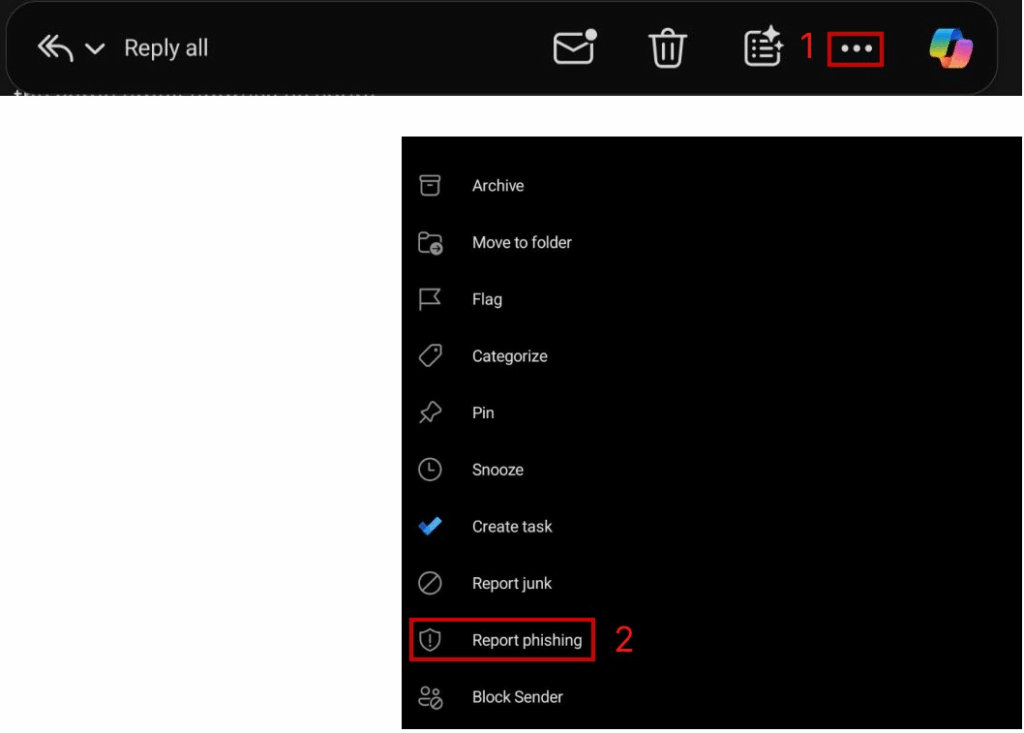
With the suspicious email selected:
Tap the ellipsis (…) icon > Select Report phishing
Reporting from Outlook on iOS (iPhone/iPad)
With the suspicious email selected:
Tap the ellipsis (…) icon near the bottom of your screen > Select Report Phishing